


| ||||
| ||||
|
Monday, September 17, 2018
How to keyword on YouTube channel


Monday, September 10, 2018
History of computer mouse
The History of the Computer Mouse
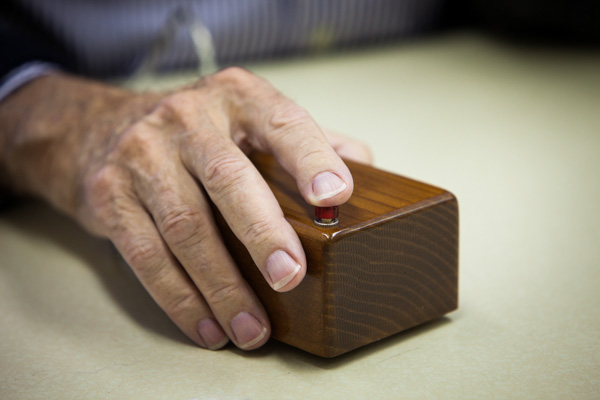
Today, the mouse is an essential input device for all modern computers but it wasn't so long ago that computers had no mouse and no graphical user interface. Data was entered by typing commands on a keyboard.
The mouse was invented by Douglas Engelbart in 1964 and consisted of a wooden shell, circuit board and two metal wheels that came into contact with the surface it was being used on.
It was 8 years later in 1972 that Bill English developed the design further by inventing what is known as the "Ball Mouse" that we know today. The ball replaced the wheels and was capable of monitoring movement in any diection. The ball came into contact with two rollers that in turn spun wheels with graduations on them that could be turned into electrical pulses representing direction and speed.
It was 8 years later in 1972 that Bill English developed the design further by inventing what is known as the "Ball Mouse" that we know today. The ball replaced the wheels and was capable of monitoring movement in any diection. The ball came into contact with two rollers that in turn spun wheels with graduations on them that could be turned into electrical pulses representing direction and speed.

At the time Bill English was working for Xerox Parc (Palo Alto Research Centre) the research and development centre set-up by Xerox to 'design the future of computing'. The mouse became part of the ground breaking Xerox Alto computer system which was the first minicomputer system to offer a graphical user interface.
It would be another 8 years before the mouse would be developed any further. An optical mouse was developed in around 1980, eliminating the ball which often became dirty from rolling round the desktop, negatively affecting its operation. In 1988, US patent no. 4751505 was issued for an optical mouse invented by Lisa M. Williams and Robert S. Cherry, which was to be sold commercially with Xerox products, such as the Xerox STAR. This mouse was produced for $17 and sold for $35. Despite this, it wasn't until around 1998 that optical mice became a commercially viable alternative to the ball mouse and infiltrated the mass consumer market., thanks to the increase in microcontroller processing power and the reduction in component costs.
Today the optical mouse has completely replaced the ball mouse, being supplied as standard with all new computers.
It would be another 8 years before the mouse would be developed any further. An optical mouse was developed in around 1980, eliminating the ball which often became dirty from rolling round the desktop, negatively affecting its operation. In 1988, US patent no. 4751505 was issued for an optical mouse invented by Lisa M. Williams and Robert S. Cherry, which was to be sold commercially with Xerox products, such as the Xerox STAR. This mouse was produced for $17 and sold for $35. Despite this, it wasn't until around 1998 that optical mice became a commercially viable alternative to the ball mouse and infiltrated the mass consumer market., thanks to the increase in microcontroller processing power and the reduction in component costs.
Today the optical mouse has completely replaced the ball mouse, being supplied as standard with all new computers.
In the next blog we write about history of computer
Brief History Of Computer. The computer as we know it today had its beginning with a 19th century English mathematics professor name Charles Babbage. ... It was called the Atanasoff-Berry Computer (ABC). In 1943 an electronic computer name the Colossus was built for the military

